
Drag-and-drop your storm roster: crews, support, trucks.
What it does
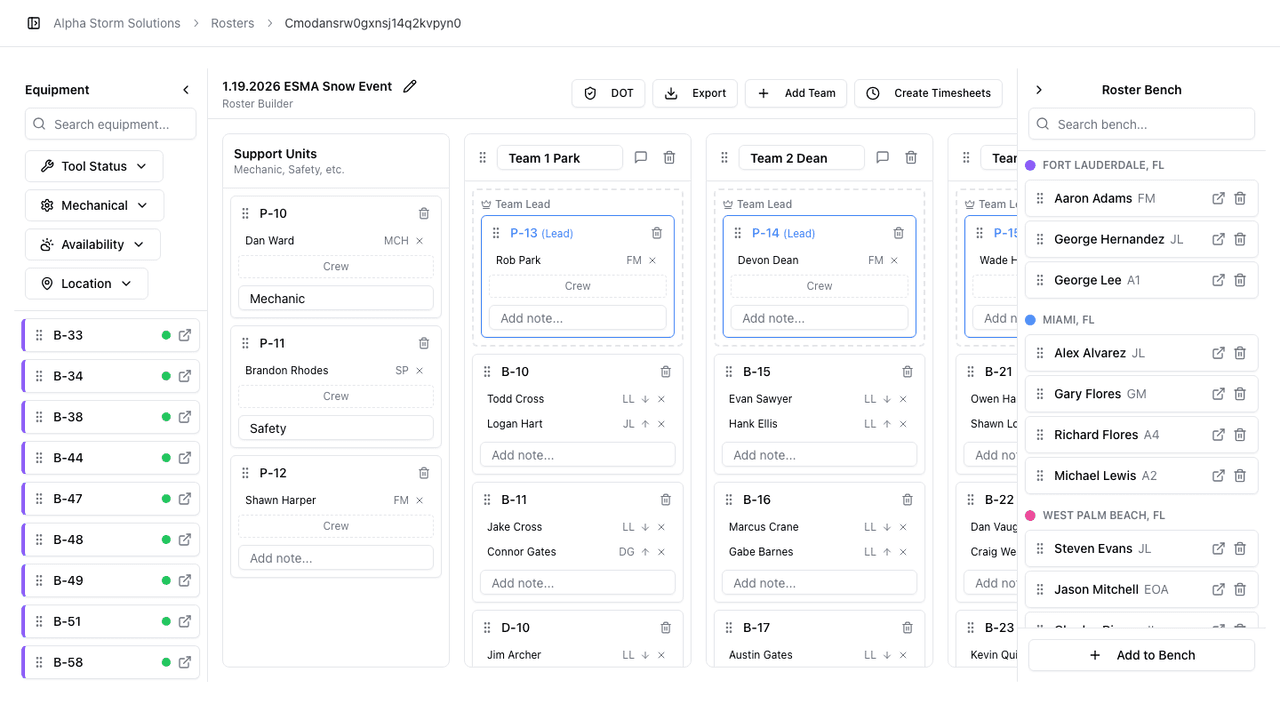
Roster Builder gives office personnel and storm operations a visual workspace for building a deployment. Create named teams, assign leads and foremen, add mechanics and safety, drag and drop available equipment and trailers onto each unit, and move employees from the bench into teams as needed. The bench is built from the employees you have already confirmed in Messenger, making it faster to turn responses into working crews. When the roster is ready, export it to Excel and send a group text to an entire team directly from StormCall.
Why it exists
Storm deployments depend on clear team structure. Everyone needs to know which truck each lineman is assigned to, who their foreman is, and how the crews are built. Roster Builder replaces the hand-kept spreadsheet and makes it possible to reorganize a 100-person roster in minutes instead of starting over.
Key capabilities
- Multiple named rosters per event, each with teams, bench, and support units
- Drag employees between teams, support roles, and the bench
- Assign team leads, foremen, equipment, and trailers to each unit
- Export the full roster to Excel for offline distribution
- Group-text a whole team straight from the roster view
See Roster Builder on a real storm
Walk through the workflow with an ops lead on our team.
Request a demo